

Details
Cloud Spend helps IT and finance teams understand, allocate, and optimize cloud licensing costs across Microsoft 365, Google Workspace, and Adobe. Extend your existing user inventory, from the Directory module, with detailed cost insights per user, group, or department – and build a reliable foundation for cost control, internal chargeback, and smarter licensing decisions.
-
A Clear Overview of All Cloud Licenses
Visualize all Microsoft 365, Google Workspace, and Adobe licenses in one place – including active, inactive, and unassigned licenses.
-
Combine Licensing Data with User Information
Bring together license data and user details from Active Directory for a complete view of who owns what, and what it costs.
-
Cost Breakdown by User, Group, or Department
Easily distribute and allocate licensing costs internally with transparent reporting per user, group, or department.
-
Adjust Prices to Match Your Own Agreements
Customize license prices to reflect your own agreements, discounts, and currency, ensuring full accuracy and transparencyin cost calculations.
-
Find and Remove Waste
Quickly detect inactive accounts, unused plans, or overlapping licenses and reclaim unnecessary spend.
-
Built for Collaboration Between IT and Finance
Provide both IT and financial teams with a shared view of licensing usage, spend, and optimization opportunities – without needing access to each platform’s admin console.
-
Track Changes and Stay Compliant
Keep a historical record of all license changes for better traceability, compliance, and audit readiness.
Supported Platforms




Asset Types
- License Plans
- SharePoint Sites
- Adobe Product Profiles
- Service Plans
- Subscriptions
Example of Bundled Content
- Inactive users with active licenses
- License plans with low assignment rates
- Cost overview per department
- User accounts with multiple license assignments
- Adobe and Microsoft 365 license utilization
- Historical trends in license usage and spend
Get Visibility.
Recent blog posts
All posts
Less Guessing, More Knowing — Wherever It's Needed
We're releasing several new features that help you get better visibility and collaboration in, and outside of, your IT organization. Asset Health in Properties, Share to Teams, and external report recipients are all really about the same problem: the right data, to the right person, at the right time.

New in vScope: Track Microsoft 365 Copilot Usage Across Your Organization
Know exactly how Copilot is used across your organization. By who, and where. vScope now has extended its coverage of ready-made reports about Copilot adoption, license utilization, and usage patterns. Immediately visible, and easy to share.
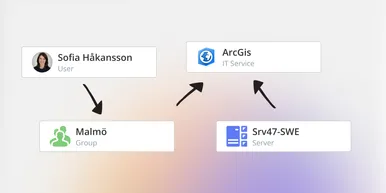
See How Your IT Environment Actually Fits Together
vScope has always mapped the relationships in your IT environment automatically. Now you can explore them visually. The Relationship Map is a new view in Properties and Governance – always current, no manual work required.