

Container
Optimize Your Container Infrastructure with vScope's Container Module
Details
Simplify and unify container management across Docker and OpenShift with vScope's Container Module. Automatically inventory containers, clusters, engines, and images; receive performance optimization suggestions; track misconfigurations; and generate insightful reports. Gain complete visibility of your containerized infrastructure, from on-prem clusters to cloud workloads, and keep your environment documented, compliant, and efficient.
-
Comprehensive Multi-Platform Inventory
Automatically discover and document containers, clusters, nodes, engines, and images from both Docker and OpenShift – no scripting or deep container knowledge required. vScope centralizes all your container assets into one searchable view.
-
Cluster and Namespace Visibility
Understand relationships between clusters, namespaces, and deployments in OpenShift. Visualize container hierarchies and dependencies for greater control and easier troubleshooting.
-
Simplified Compliance and Configuration Checks
Run built-in compliance and configuration checks across your Docker and OpenShift environments to ensure secure, standardized setups that meet your organization’s policies.
-
Performance Optimization Suggestions
Receive bundled recommendations to streamline your container environment, ensuring optimal performance, resource utilization, and capacity planning across all container platforms.
-
Misconfiguration Tracking
Automatically highlight containers stuck in restart loops, identify resource constraints, and pinpoint issues with restart policies to facilitate improvements.
-
Resource Utilization and Growth Reporting
Generate detailed reports on image sizes, utilization, and container activity to monitor growth, optimize capacity, and improve operational planning.
-
Collaborative Reporting Tools
Easily distribute key container metrics and reports to teams and stakeholders, promoting transparency and collaborative communication between IT operations and business teams.
Supported Platforms

Asset Types
- Containers
- Clusters
- Nodes
- Namespaces
- Deployments
- Docker Volumes
- Engines
- Images
Example of Bundled Content
- Containers killed due to running out of memory
- Clusters with underutilized nodes
- Namespaces with inactive deployments
- Containers not run in 14 days
- Containers not run in 7 days
- Containers with high restart count
- Images unused by any containers
Get Visibility.
Recent blog posts
All posts
Less Guessing, More Knowing — Wherever It's Needed
We're releasing several new features that help you get better visibility and collaboration in, and outside of, your IT organization. Asset Health in Properties, Share to Teams, and external report recipients are all really about the same problem: the right data, to the right person, at the right time.

New in vScope: Track Microsoft 365 Copilot Usage Across Your Organization
Know exactly how Copilot is used across your organization. By who, and where. vScope now has extended its coverage of ready-made reports about Copilot adoption, license utilization, and usage patterns. Immediately visible, and easy to share.
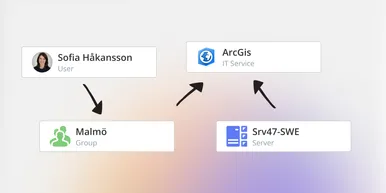
See How Your IT Environment Actually Fits Together
vScope has always mapped the relationships in your IT environment automatically. Now you can explore them visually. The Relationship Map is a new view in Properties and Governance – always current, no manual work required.