


Optimize Your Database Environment: Pre-Built Content for Performance and Savings
Databases are the backbone of nearly every modern organization. From customer data to transactions and internal systems, your business relies on their performance and availability. In this post, we explore new content in vScope that helps you simplify and succeed in database management.
 Jacob Brodd •
 Common Challenges in Database Management
After talking to several vScope users, we learned a lot about the struggles of managing one of the most critical components in the datacenter–databases. From these insights, we created and bundled content in the latest vScope update to help IT teams gain better control.
But let’s start with the common challenges that inspired this work. These are the most frequent pain points we’ve heard from database and infrastructure professionals:
Business Continuity Risks
- A single database disruption can bring operations to a halt.
- Downtime, performance issues, or failed backups can lead to serious financial and reputational damage.
Data Security & Integrity
- Databases often store sensitive and confidential data.
- Unauthorized access or corruption can compromise security and trust.
Compliance & Audit Pressure
- Standards like GDPR, PCI DSS, and HIPAA require transparency and control over how data is stored, secured, and managed.
Performance Bottlenecks
- Misconfigured or outdated database instances can degrade performance across entire systems.
Uncontrolled Costs
- Without visibility, it’s easy to waste resources on overprovisioned storage, memory, or compute–or overinvest in infrastructure you don’t actually need.
What’s New in vScope
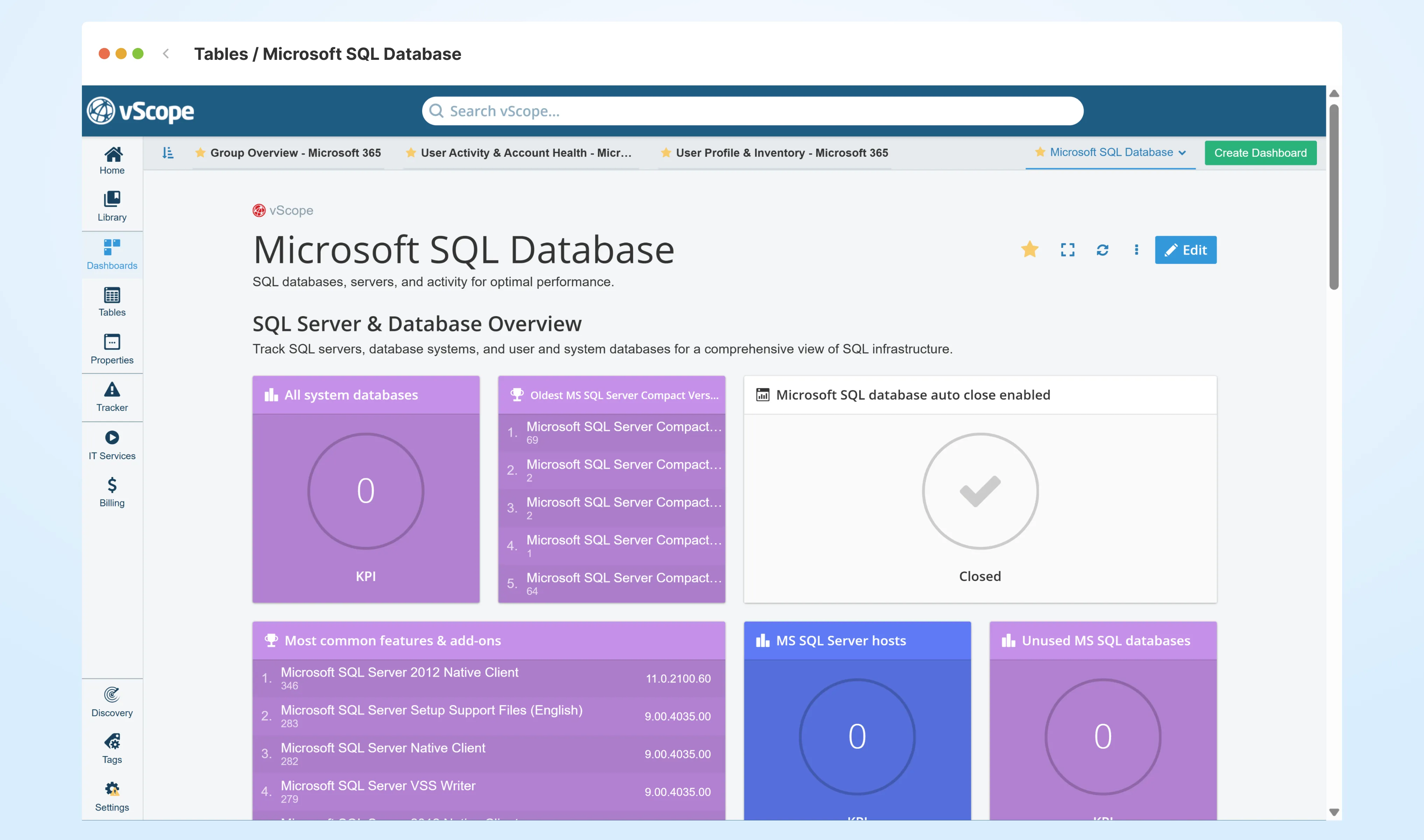
To help you address these challenges, we’ve added a range of new database-focused content in vScope. These features provide a unified, filterable, and exportable view of your database landscape–no scripts or spreadsheets needed.
Database Insights at Your Fingertips
The latest vScope release includes several pre-built dashboards, tables, and Tracker Cases designed to answer your most pressing database questions. Here are some highlights:
-
Database Compatibility Overview Get a high-level summary of database versions and system compatibility across your environment.
-
Auto Close Enabled Identify databases with auto-close enabled–a setting that may lead to performance or availability issues.
-
Auto Shrink Enabled Detect auto shrink configurations that could cause fragmentation and slowdowns.
-
SQL Instance Backup Status Ensure all SQL Server databases are backed up and ready to be restored.
-
SQL System Estate Overview Gain a comprehensive view of your SQL Server infrastructure for better planning and monitoring.
Why It Matters – Benefits for You as a Database Administrator
With database inventory added to vScope’s unified asset repository, you gain better visibility, control, and insight. Here’s how the new content supports your work:
-
Ensure Availability & Continuity Track backup status and database health to prevent costly downtime.
-
Improve Security & Data Integrity Spot risks and misconfigurations before they escalate into critical issues.
-
Simplify Compliance & Auditing Prove control over data protection using clear, exportable evidence tied to your actual infrastructure.
-
Boost Performance Identify inefficiencies and tune configurations for optimal system behavior.
-
Control Costs Avoid overprovisioning and unnecessary infrastructure spend by knowing exactly what’s in use.
Ready to Take Control of Your Database Environment?
With vScope’s new database content, you no longer need to rely on scripts, tools, or tribal knowledge to manage your most critical systems. Everything is available in one place–accurate, filterable, and easy to share and act on.
Explore the new content in your vScope today or get in touch if you’d like a walkthrough.
Related blog posts

Webinar Recap: How to Work with Modern IT Governance in vScope
We recently hosted a webinar on modern IT governance with vScope Governance. Here are the key takeaways: on why IT environments become complex, how a governance model works in practice, and how your teams can move from scattered spreadsheets to a living asset register.

From Intune to vScope: Why Endpoint Management Alone Is Not Enough
Intune gives you strong endpoint control. vScope turns that data into shared operational context for operations, security, compliance, and finance.

Why IT inventory initiatives often fail
IT inventory and discovery promise control, security, and cost clarity—yet many projects stall. Here's why they falter without the right platform, and what reliable discovery should look like.
Microsoft 365 Pricing Changes 2026: What It Means for Your Budget
Microsoft is updating pricing and packaging for Microsoft 365 in 2026. Here’s what the currency adjustments and July price increases mean – and how CIOs and M365 admins should respond.
Effective Configuration Management Requires Transparency Across All Systems
In modern IT environments, the gap between reported and actual configuration is bigger than most people realize. In this article, I explain why accurate inventory requires collecting data about each asset from multiple sources – not just one.

How Lifecycle Cost Analysis Helps You Make Smarter IT Decisions
IT teams are under constant pressure to deliver more with less. But without understanding the true cost of every server, license, or laptop, even the most well-planned budgets can spiral out of control.

How Microsoft's New Licensing Model Impacts You - and How to Prepare with vScope
Starting November 2025, Microsoft will remove volume discounts in Enterprise Agreement, MPSA, and OSPA. In this article, we explain what the change means for your organization, and how vScope helps you gain full visibility and control of licenses and costs across your environment.
Last Day for Windows 10 - Are Your Clients Ready?
As of October 15, 2025, Microsoft officially ends support for Windows 10. In this article, we explore what that means, why Microsoft is making this change, and how you can use vScope’s inventory and prebuilt insights to stay ahead.
Warranty Management in Practice: Checklist, Pitfalls, and How to Automate with vScope
Learn how to manage device warranties the right way. We walk through a step-by-step checklist for manual warranty tracking and how to automate follow-ups, reports, and alerts with vScope Discovery.