

Details
Get IT visibility across user, groups and permissions with vScope's Directory Module. Automate Active Directory audits, track changes, and identify obsolete accounts or permissions. Gain insights with built-in reports for GPOs, domains, and users, while supporting platforms like Azure AD, Google Workspace, and Adobe. Simplify compliance, enhance security, and optimize your directory with ease.
-
Automated Active Directory Audits
Automatically inventory and document users, groups, and permissions without manual scripting, simplifying the audit process.
-
User-Friendly Visualization
Easily visualize configurations, accounts, and permissions through an intuitive interface designed for all skill levels.
-
Obsolete Records Identification
Quickly pinpoint unused Group Policy Objects (GPOs), groups, or inactive users that can be safely removed to optimize Active Directory.
-
Built-In Reporting
Access a wealth of built-in reports covering GPOs, domains, users, and groups, generated automatically for valuable insights.
-
Comprehensive Data Support
Supports Active Directory, Microsoft Entra ID (Azure AD), Google Workspace, and Adobe, providing extensive data and information.
-
Change Tracking and Analysis
Track any changes in configurations, such as permissions, with built-in reports and analyses to maintain security and compliance.
Supported Platforms




Asset Types
- Domains
- User Accounts
- Group Policies
- Organizational Units
- Groups
Example of Bundled Content
- Unused user accounts
- User accounts not assigned to any group
- User accounts that have been locked
- User accounts with recently changed manager
- User accounts without a logon script
- Organizational units with enforced group policies
- Local administrator accounts named 'Administrator'
- Local user accounts with admin privileges
Get Visibility.
Recent blog posts
All posts
Microsoft 365 Pricing Changes 2026: What It Means for Your Budget
Microsoft is updating pricing and packaging for Microsoft 365 in 2026. Here’s what the currency adjustments and July price increases mean – and how CIOs and M365 admins should respond.
 Simon Håkansson March 2, 2026
New datasource: Proxmox
vScope now discovers Proxmox VE for hosts, VMs, containers, networks, and capacity. This will help you bring full visibility into hosts, VMs, containers, capacity and other Proxmox assets.
 Anton Berghult February 24, 2026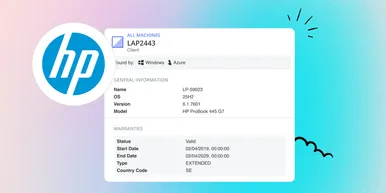
HP Warranty: Deeper lifecycle visibility
Fetch and sync warranty data from HP, directly to vScope for improved planning and control of your assets' life cycle status. In this post I will briefly go through the latest feature in vScope, and how this strengthen the value of your asset repository.
Anton Berghult February 23, 2026