


Details
Connect your Windows environment to vScope and gain a complete, continuously updated inventory of servers, clients, and workstations. Turn technical data into actionable insights that improve operations, security, and asset management.
-
Comprehensive Asset Visibility
Automatically discover and map all Windows machines–on-premises and virtual–into a single, unified inventory that provides clarity across infrastructure and users.
-
Flexible Data Collection
vScope connects via PowerShell, WMI, or WinRM to securely collect detailed information from your Windows environment–no agents or manual setup required.
-
Operational Efficiency
Eliminate manual spreadsheets and scattered scripts. vScope continuously collects OS details, hardware specs, uptime, and configuration data to keep your asset inventory always accurate and up to date.
-
Improved Security & Compliance
Identify outdated systems, missing patches, and unsupported versions to strengthen IT governance and reduce risks across your Windows landscape.
-
Enhanced Collaboration
Make Windows data accessible to both technical and non-technical teams. vScope turns complex system information into clear insights for planning, budgeting, and reporting.
-
On-prem & Privacy-first
All data collection happens securely within your environment. No external connections–ensuring full control and compliance with internal policies.
Asset Types
- Server
- Client
- Certificates
- Applications
- Jobs
- Services
Example of Bundled Content
- Windows servers running unsupported OS versions
- Last Windows patch older than 60 days
- Devices inactive for 90+ days
- Auto-reboot after updates configured
- Windows updates pending system reboot
Get Visibility.
Recent blog posts
All posts
Less Guessing, More Knowing — Wherever It's Needed
We're releasing several new features that help you get better visibility and collaboration in, and outside of, your IT organization. Asset Health in Properties, Share to Teams, and external report recipients are all really about the same problem: the right data, to the right person, at the right time.

New in vScope: Track Microsoft 365 Copilot Usage Across Your Organization
Know exactly how Copilot is used across your organization. By who, and where. vScope now has extended its coverage of ready-made reports about Copilot adoption, license utilization, and usage patterns. Immediately visible, and easy to share.
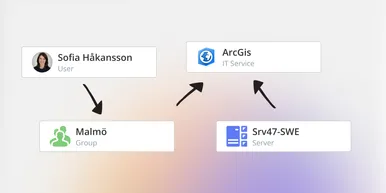
See How Your IT Environment Actually Fits Together
vScope has always mapped the relationships in your IT environment automatically. Now you can explore them visually. The Relationship Map is a new view in Properties and Governance – always current, no manual work required.