


Microsoft Intune
Inventory managed devices, compliance policies, and app deployments from Microsoft Intune
Details
Bring Microsoft Intune data into vScope to inventory managed endpoints, understand compliance status, and track application deployments. Microsoft Intune is collected as part of vScope's Azure Resource Manager integration – no separate credential required.
-
Managed Device Inventory
Maintain a full inventory of all Intune-enrolled devices – Windows, macOS, iOS, and Android – including OS version, enrollment status, and last check-in. Always know what's managed and what isn't.
-
Compliance Policy Overview
See which devices meet your Intune compliance policies and which do not. Identify non-compliant devices, understand gaps in your security baseline, and act before issues escalate.
-
Application Deployment Visibility
Track managed applications and their assignments across your device fleet. Understand app coverage and identify devices missing critical software.
-
Cross-source Endpoint Correlation
Combine Intune data with Entra ID, Microsoft Defender, and Windows sources already in vScope. Eliminate blind spots and build a complete, authoritative picture of every managed endpoint.
Asset Types
- Clients
- Mobile Devices
- Apps/Applications
Example of Bundled Content
- Non-compliant devices
- Devices inactive for 30+ days
- Device OS version overview
- Managed application deployment report
Get Visibility.
Recent blog posts
All posts
Less Guessing, More Knowing — Wherever It's Needed
We're releasing several new features that help you get better visibility and collaboration in, and outside of, your IT organization. Asset Health in Properties, Share to Teams, and external report recipients are all really about the same problem: the right data, to the right person, at the right time.

New in vScope: Track Microsoft 365 Copilot Usage Across Your Organization
Know exactly how Copilot is used across your organization. By who, and where. vScope now has extended its coverage of ready-made reports about Copilot adoption, license utilization, and usage patterns. Immediately visible, and easy to share.
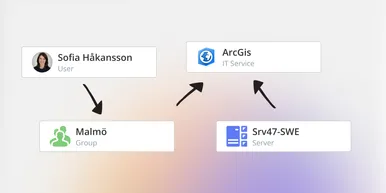
See How Your IT Environment Actually Fits Together
vScope has always mapped the relationships in your IT environment automatically. Now you can explore them visually. The Relationship Map is a new view in Properties and Governance – always current, no manual work required.