


Details
Gain a detailed inventory of your organization's iPhones, iPads, and Macs managed through Jamf within vScope.
-
Comprehensive Apple device inventory
Track detailed information about your iPhones, iPads, and Macs managed by Jamf, all within your central asset repository in vScope.
-
Visualize Jamf device configurations
Inventory and review the configuration profiles and restrictions applied to your Apple devices through Jamf, providing visibility into your device management policies in vScope.
Asset Types
- Mobile Devices
- Laptops
- Applications
Example of Bundled Content
- Jamf Overview
- Jamf Client Documentation
- Jamf Client Hardware Documentation
- Jamf Client OS Documentation
Get Visibility.
Recent blog posts
All posts
Less Guessing, More Knowing — Wherever It's Needed
We're releasing several new features that help you get better visibility and collaboration in, and outside of, your IT organization. Asset Health in Properties, Share to Teams, and external report recipients are all really about the same problem: the right data, to the right person, at the right time.

New in vScope: Track Microsoft 365 Copilot Usage Across Your Organization
Know exactly how Copilot is used across your organization. By who, and where. vScope now has extended its coverage of ready-made reports about Copilot adoption, license utilization, and usage patterns. Immediately visible, and easy to share.
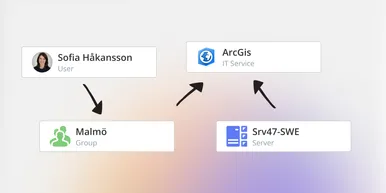
See How Your IT Environment Actually Fits Together
vScope has always mapped the relationships in your IT environment automatically. Now you can explore them visually. The Relationship Map is a new view in Properties and Governance – always current, no manual work required.