

Security advisory · 22 October 2026
Critical PHP vulnerability. Do you know where PHP runs?
Two critical flaws in PHP can let an outsider run code on your servers without logging in. The first step is to know which servers run PHP, and which version.
vScope is not affected
vScope does not use PHP in any way. In addition, vScope runs on-prem in your own environment and is protected by your own security practices.
CVE-2026-109618 · CVE-2026-109619 · CVSS 9.2
What has happened
Two critical flaws
CVE-2026-109618 and CVE-2026-109619 can allow unauthenticated remote code execution. Both are rated CVSS 9.2, and attacks have been reported.
Fixes are available
PHP 8.5.12, 8.4.27, 8.3.36 and 8.2.35 were released on 21 October 2026. Older branches depend on your vendor's packaging.
More than websites
Any PHP runtime serving web requests is exposed: Apache with mod_php, PHP-FPM, php-cgi, FrankenPHP and LiteSpeed. Many commercial applications bundle their own PHP.
Sources
How vScope helps
Patching is the easy part. Knowing where to patch is the hard part. This is what a current software and package inventory is for.
1
Software and package audit
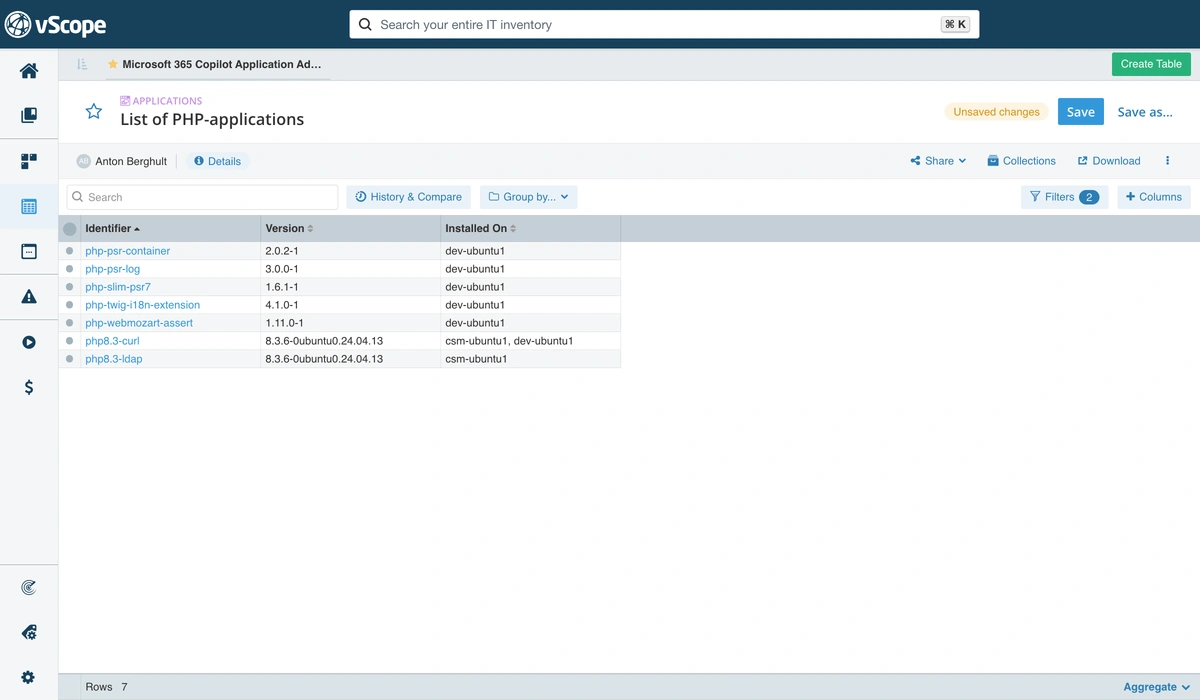
Search your inventory for PHP and see the discovered servers that have it, which version they run and where it came from. Sort by version to patch the oldest first.
2
Ready-made reports and insights
vScope comes with ready-made reports and insights for PHP, so you don't have to build the searches yourself.
3
See which services are affected
Servers are connected to the applications they run and the IT services they deliver. Follow the relationships and patch the internet-facing services first.
4
Windows and Linux in one view
vScope scans both Windows and Linux environments. Windows applications and Linux packages end up in the same asset repository, with one process for both.
5
The data is already there
vScope is a self-updating asset library, always available to everyone who needs the information. If you run vScope, you can start searching today.
6
Follow up until it's fixed
vScope keeps a history of changes. Run a new discovery after patching and search again to confirm that servers moved to a fixed version, and keep it as documentation.
Find PHP in vScope
- 1
Create a table of the asset type
Applicationsand search forphp, or for software you know uses PHP. - 2
Use the column
Installed Onto list the endpoints that run the application. - 3
Add
php, or an application name, as a filter to narrow the list. - 4
You can also use the asset type
Processesto see PHP processes that are running.
Linux distributions often backport fixes without changing the version number, so check your vendor's advisory before you decide that a server is vulnerable.
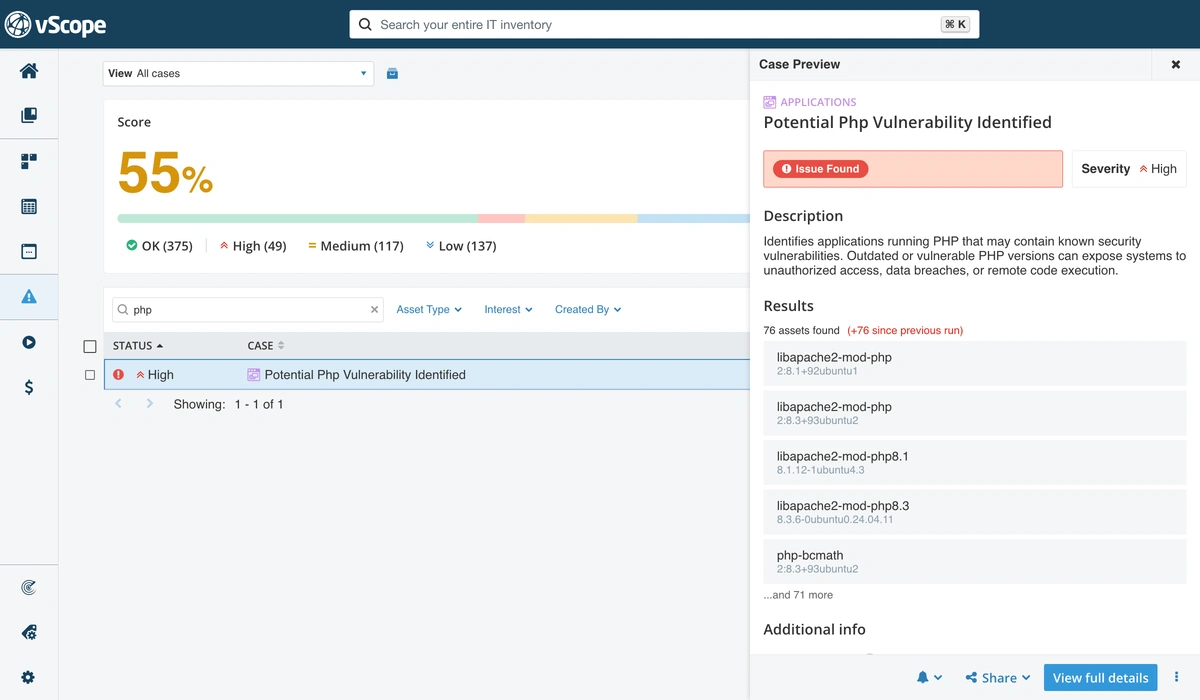
Ready-made reports and insights
You don't have to build the searches yourself. vScope comes with ready-made reports and insights that help you with these steps, for example:
PHP installations
Where PHP is installed in your environment.
Potential vulnerable applications using PHP
Applications running PHP that may contain known security vulnerabilities.
Vulnerable PHP versions discovered
PHP versions in your environment that are known to be vulnerable.
Patch what matters first
In vScope, servers are connected to the applications they run and the IT services they deliver. Find the servers that run PHP, then follow the relationships to see which services depend on them. Patch the internet-facing ones first.
Delivers → Web shopIT Service · Internet-facing
Delivers → IntranetIT Service · Internal
- See which IT services are exposed before you start patching.
- Spot internet-facing services and prioritize their servers.
- Find servers with PHP that no service depends on, and handle them later or retire them.
Is vScope affected?
No.
vScope does not use PHP in any way, so CVE-2026-109618 and CVE-2026-109619 do not affect it. In addition, vScope runs on-prem in your own environment. It is not a hosted service, and it is protected by your own security practices: your network segmentation, your access control and your patching routines. Your inventory data stays with you.
What to do now
- 1
Search your inventory for PHP and list servers by version.
- 2
Prioritize internet-facing servers and anything running
mod_php. - 3
Patch or replace to a fixed version. Check your application vendor's advisory, since some applications bundle their own PHP. Rebuild container images and restart all web workers.
- 4
If you can't patch right away, limit public access and apply request-size limits in your reverse proxy or WAF.
- 5
Run a new discovery and verify in vScope that no discovered server is left on a vulnerable version.
What vScope doesn't cover
vScope shows what it can discover. No inventory covers everything, so keep these gaps in mind when you search for PHP:
Undiscovered platforms and assets
Servers, containers (Docker, Kubernetes) and other platforms that discovery isn't set up for, and shadow IT outside your reach, such as SaaS and external clouds.
Assets vScope can't log in to
Discovery depends on credentials. Where access is missing or insufficient, the data will be too.
PHP inside your own code
PHP that is embedded in custom-built software, or bundled in a way that isn't registered as an installed package, may not show up in a software search.
Use vScope to cover what you know about, and treat gaps as a reason to extend discovery.
Learn more about vScope
Know what runs in your environment before the next vulnerability
vScope is agentless and is quickly installed and configured in your environment. Book a demo and we'll show you how.