


System Center Configuration Manager
Microsoft SCCM Inventory and Configuration Visibility
Details
Centralize your inventory and gain reporting insights into servers, clients, deployments, and applications managed by Microsoft System Center Configuration Manager (SCCM) within vScope.
-
Comprehensive Server and Client Inventory
Consolidate a detailed inventory of both servers and client workstations managed by SCCM into your central vScope asset repository for a unified view of your managed endpoints.
-
Application Deployment Tracking
Find the status and success rates of application deployments managed through SCCM directly within vScope, ensuring effective software distribution across your environment.
-
Deployment Insights
Gain visibility into your SCCM deployment data, allowing you to track the distribution of software and updates across your managed devices within vScope.
-
Application Inventory
Maintain a clear inventory of the applications managed and deployed through SCCM, providing a centralized view of your software assets within vScope.
-
Agent Status Monitoring
Identify clients where the SCCM agent is missing, ensuring complete manageability and data collection across your environment as reported in vScope.
-
Orphaned Server Identification
Discover servers managed by SCCM that might not be present in other inventory sources within vScope, helping to maintain a consistent and accurate asset record.
Asset Types
- Server
- Client
- Deployment
- Application
Example of Bundled Content
- SCCM Agents Missing on Clients
- Servers Managed Exclusively by SCCM
- Laptop and Desktop Inventory Details
Get Visibility.
Recent blog posts
All posts
Tracker evolves: from case list to compliance overview
From a list of issues to a clear compliance overview. The latest Tracker update introduces a more structured way to monitor, prioritize, and improve your IT environment. Here's the latest update about vScope Tracker!
 Anton Berghult March 30, 2026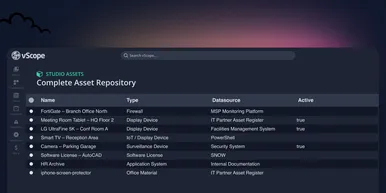
Introducing vScope Studio – Discovery Without Limits
vScope Studio lets you connect new data sources and document more asset types in your asset repository. A great add-on to your asset discovery if you want to take your asset repository to the next level.
Anton Berghult March 27, 2026 
Why IT inventory initiatives often fail
IT inventory and discovery promise control, security, and cost clarity—yet many projects stall. Here's why they falter without the right platform, and what reliable discovery should look like.
Anton Berghult March 24, 2026