


Details
Document licensed users and work items and bridge the gap between asset repository and IT Service Management.
-
Track User Activity
Gain insights into JIRA license utilization to identify potential cost savings and optimize your software spending.
-
Follow Up on Work Items
Collect JIRA work items and link them to relevant entities in vScope. Establish compliance checks to ensure timely resolution of issues.
-
Connect Asset and Tickets
View the relationship between assets managed in vScope and associated Jira work items. This provides enhanced understanding and facilitates asset-specific statistics.
Asset Types
- User Accounts
- Groups
- Work Items
Example of Bundled Content
- Jira Users Documentation
- Inactive Jira User Accounts With Assigned License
- Stale Issues: Issues Not Updated in 180 Days
Get Visibility.
Recent blog posts
All posts
Tracker evolves: from case list to compliance overview
From a list of issues to a clear compliance overview. The latest Tracker update introduces a more structured way to monitor, prioritize, and improve your IT environment. Here's the latest update about vScope Tracker!
 Anton Berghult March 30, 2026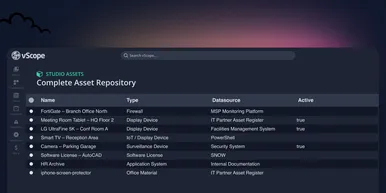
Introducing vScope Studio – Discovery Without Limits
vScope Studio lets you connect new data sources and document more asset types in your asset repository. A great add-on to your asset discovery if you want to take your asset repository to the next level.
Anton Berghult March 27, 2026 
Why IT inventory initiatives often fail
IT inventory and discovery promise control, security, and cost clarity—yet many projects stall. Here's why they falter without the right platform, and what reliable discovery should look like.
Anton Berghult March 24, 2026