


New in vScope: A More Personal Experience with Interest Profiles
We’re introducing Interest Profiles in vScope, a new way to make vScope more relevant and helpful for every user. Get a home screen and library experience tailored to your interests, responsibilities, and daily work.
 Anton Berghult •
 In vScope, you’ll find thousands of ready-made reports, dashboards, and analyses designed to help you save time and move from data to insight to action. We continuously update our content library based on user feedback, industry trends, and new features within vScope. This saves you countless hours and helps your organization stay on top of what can be improved in your IT delivery.
Until now, this content has been “one-size-fits-all.” Everything was presented the same way to every user, regardless of role, responsibilities, or areas of focus.
But in reality, not everyone needs the same views, reports, or recommendations.
It’s time to change that.
Now we’re launching Interest Profiles, a new way to make vScope’s ready-made content more relevant, more personal, and more useful for you.
Why this matters
IT technicians, operations managers, and CIOs deal with completely different challenges every day. When everything is presented in the same way, important insights can easily get lost in the noise.
We often see that:
- Technicians want to quickly find what relates to their technology stack, not everything related to governance or service management.
- Operations managers need recommendations that match their areas of responsibility and ongoing initiatives.
- CIOs need insights that support governance, compliance, and risk reduction, not deep-dive optimizations of individual servers.
With Interest Profiles, every user gets a more focused, relevant, and supportive vScope experience from day one.
What’s new?
When you log in, or create a new account, you’ll be greeted with a simple question:
“What are you interested in?”
You can choose from areas such as:
- Data & Application
- Security & Risk
- End-User & Workplace IT
- Infrastructure & Cloud
…with more to come.
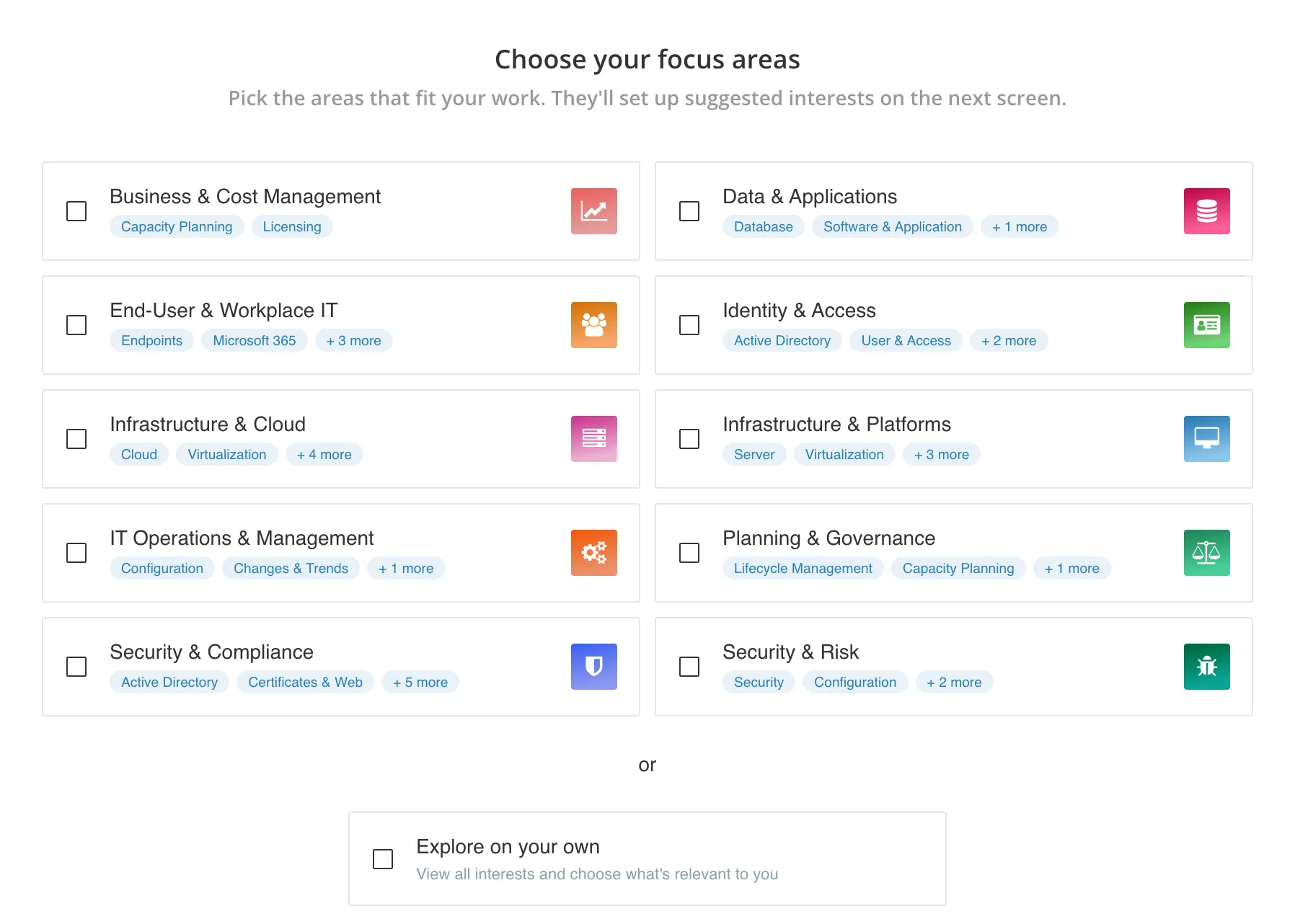
Once you’ve selected at least one area and created your profile, vScope will automatically:
- highlight more relevant dashboards and tables on the home screen
- curate content in Library → For You
- guide you directly to the parts of vScope that will create the most value for you
Interest Profiles are available for all roles except Viewer.
You can create or update your interest profile at any time under Edit Profile.
Refined Content Interests
To make your new personalized feed even better, we’ve fine-tuned interests for all bundeled contnet in vScope. These refinements bring several benefits:
- Smarter Groupings: You’ll notice more complete and relevant overviews. For instance, our former ‘Laptops & Desktops’ interest has evolved into ‘Endpoints’, now also encompassing printers and mobile devices, offering a complete picture for areas like ‘End-User & Workplace IT’.
- No Content Lost: While some previous interests have evolved or been merged, all content remains available, simply re-organized for better clarity and focus.
- Automatic & Faster: It all happens seamlessly in the background, helping you cut through the noise and surface the right content faster.
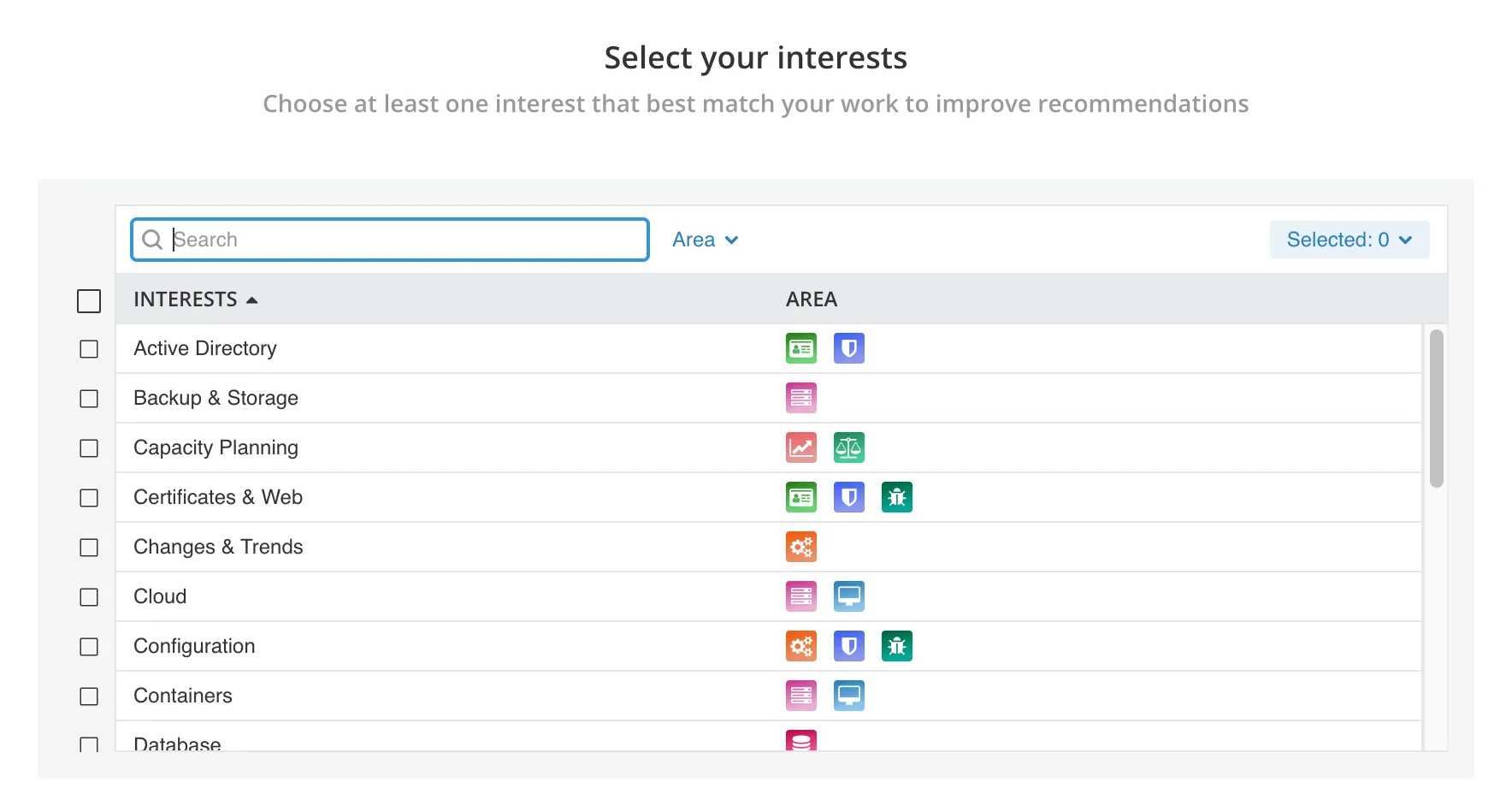
How it helps you in your daily work
Tailored suggestions based on your needs
Find the right content without digging.
For example: if you work with networking, vScope will automatically highlight more relevant material around switches, ports, AD accounts, or certificates.
Easier discovery of new content
Whenever we release new or updated material, you’ll immediately see what’s relevant to your interests, right on the home screen and in the library.
Faster filtering
With an Interest Profile, you can switch to a more focused view by filtering on For You, showing only the content that matters most to you.
What’s next?
Our vision for Interest Profiles is to deliver a more tailored vScope experience, helping you reduce noise, find what you need faster, and move from data to insight more quickly.
Over time, we see Interest Profiles becoming a way for vScope administrators to:
- package predefined profiles for different user groups (e.g., country, function, company, or department)
- give new users a stronger start with automatically curated content
- highlight recommended insights in Tracker based on each user’s focus areas
- improve search results by weighting content toward the user’s interests
In short: a more personal, guided, and valuable experience, for your entire organization.
Try Interest Profiles today
Log in, open your profile, and choose your areas of interest.
It takes less than 30 seconds, and makes your vScope experience smarter and more personal.
Need help getting started? Just let us know, we’re happy to assist!
Related blog posts
All posts
New datasource: Proxmox
vScope now discovers Proxmox VE for hosts, VMs, containers, networks, and capacity. This will help you bring full visibility into hosts, VMs, containers, capacity and other Proxmox assets.
 Anton Berghult February 24, 2026
HP Warranty: Deeper lifecycle visibility
Fetch and sync warranty data from HP, directly to vScope for improved planning and control of your assets' life cycle status. In this post I will briefly go through the latest feature in vScope, and how this strengthen the value of your asset repository.
Anton Berghult February 23, 2026 
IT Services Become Governance – Put Your Assets in Full Business Context
We have renamed IT Services (Service Mapping) to Governance. However, this update is not only about renaming; it expands the feature from 'IT service-only' modeling to supporting any business context – including applications, vendors, ownership, policies, and more. Let's go through what this means for you.
Anton Berghult February 20, 2026 
Standardize IT Billing Faster with Built-In Price List Templates
Reduce manual pricing work and get more accurate IT billing in place faster using reusable, best-practice price list templates. Here is the latest feature of vScope Billing
Anton Berghult January 26, 2026 
Introducing Network Port Mapping in vScope: Finally See What’s Connected – and Where
One of the most requested features is now here. With Network Port Mapping for SNMP, IT teams can instantly see how devices are connected across the network, no more remoting into switches, outdated documentation, or guesswork. This update helps you troubleshoot faster, improve documentation, and strengthen overall network security.
Anton Berghult November 26, 2025 
New Price List for Easier Control of Microsoft 365 Costs
With vScope’s new price list for Microsoft 365, it’s easier than ever to understand, monitor, and optimize your license costs. The price list is automatically applied to your asset inventory once vScope is connected to your Microsoft 365 environment.
Anton Berghult October 22, 2025 
News in vScope: Smarter Filters, a Fresh Tables Experience & 200+ New Content Items
Discover the all-new Filters, redesigned Tables view, and powerful new content for Microsoft 365, Active Directory, and SQL databases, here is the latest update of vScope.
 vScope August 25, 2025
 vScope 3.32
Explore all the updates and improvements in vScope 3.32, including new Microsoft 365 management, Jira integration, AWS asset support, and smarter lifecycle management with warranty collection.
vScope May 26, 2025 vScope 3.31
History & Changes have been introduced in Tracker, making it easier to track and understand how assets evolve over time. You can now select from recent Tracker runs, and vScope will automatically highlight changes from the previous Tracker run (i.e. when Tracker cases were last evaluated).
Anton Berghult February 11, 2025