


Details
Get a unified overview of warranty status and coverage for all your HP, Dell and Lenovo devices inside vScope. Track expirations, filter by device types, and create shared insights with people in eg. procurement and leadership.
-
Centralized Warranty Overview
Consolidate warranty status, coverage type, and start/end dates for discovered servers, clients, and printers in one view.
-
Proactive Expiration Tracking
Receive notifications and reports for warranties nearing expiration (e.g., 30/60/90 days) to plan renewals or replacements on time.
-
Historical development
Use vScope’s history feature to track assets throughout their lifecycle – from warranty renewals to final decommissioning.
-
Simplified Reporting & Filtering
Generate custom reports on warranty status and filter by expiration date, device type, or vendor (HP/Dell/Lenovo) for actionable insight.
-
On-prem & Privacy
All data stays within your environment. Ideal for security- and compliance-sensitive organizations.
Asset Types
- Server
- Client
- Printer
- Mobile Devices
Example of Bundled Content
- Warranties expiring in 90 days
- Laptops without active warranty
- Devices with extended warranty
Get Visibility.
Recent blog posts
All posts
Microsoft 365 Pricing Changes 2026: What It Means for Your Budget
Microsoft is updating pricing and packaging for Microsoft 365 in 2026. Here’s what the currency adjustments and July price increases mean – and how CIOs and M365 admins should respond.
 Simon Håkansson March 2, 2026
New datasource: Proxmox
vScope now discovers Proxmox VE for hosts, VMs, containers, networks, and capacity. This will help you bring full visibility into hosts, VMs, containers, capacity and other Proxmox assets.
 Anton Berghult February 24, 2026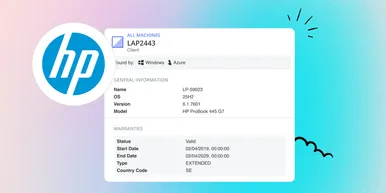
HP Warranty: Deeper lifecycle visibility
Fetch and sync warranty data from HP, directly to vScope for improved planning and control of your assets' life cycle status. In this post I will briefly go through the latest feature in vScope, and how this strengthen the value of your asset repository.
Anton Berghult February 23, 2026